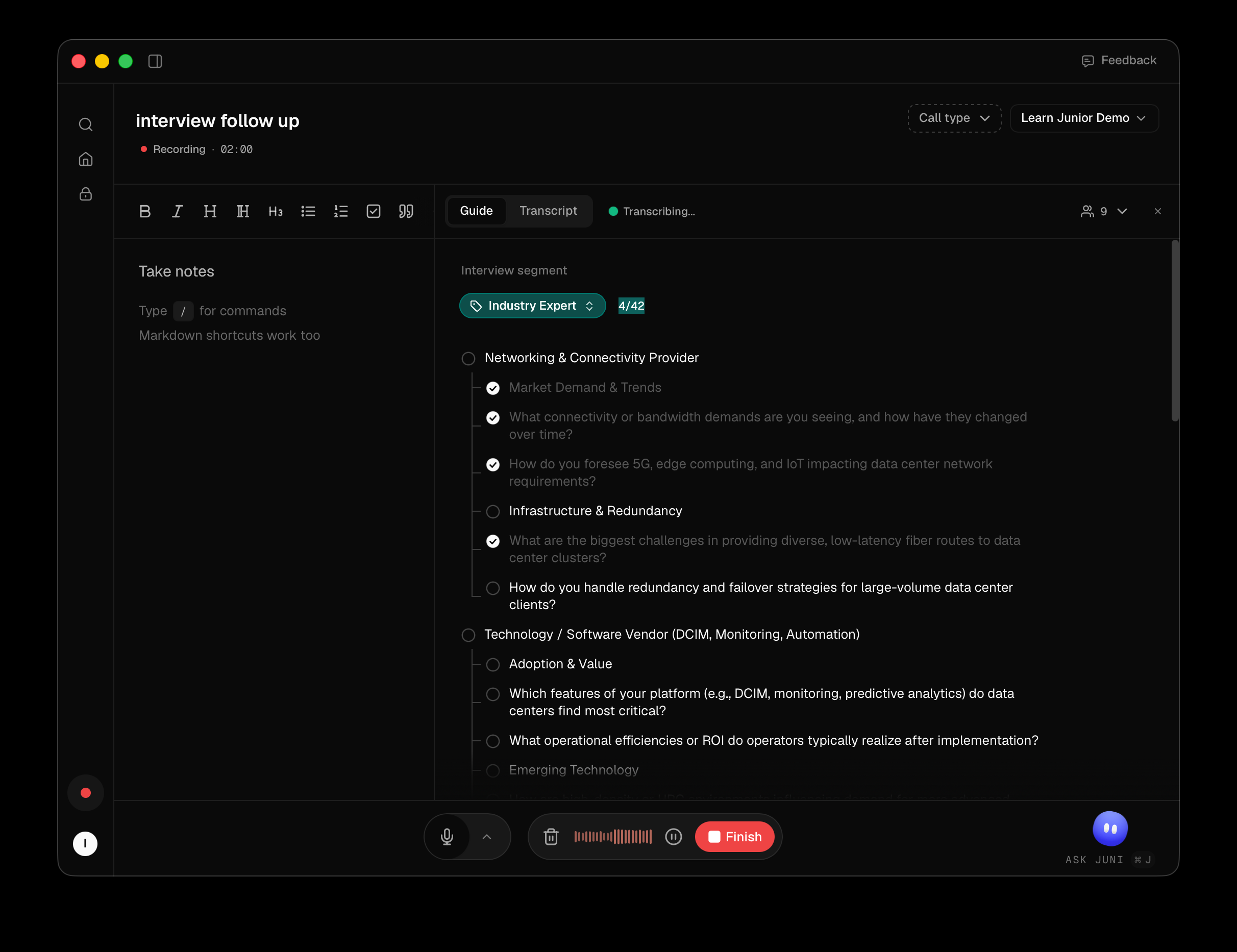
If the project has a guide, a Guide tab appears in the recording window. Each section shows how many of its questions you've covered, and each question fills in as it's dealt with.
Working through it
- Junior ticks questions off as it hears them covered in the transcript.
- You can tick or untick any question yourself by clicking it. Your click always wins. Junior won't un-tick something you marked, or re-tick something you cleared.
- Pick a different guide with Search guides if the project has several.
Guides are read-only here. Junior points you at the web app to change them, with Edit on Junior web or Create on Junior web.
Questions
I have no Guide tab.
Either the call isn't in a project, or the project has no guide. Junior says which: "Personal calls don't have guides" if it's unfiled, or "This project has no interview guides" if it's filed but the project has none. Assign the call to a project from the recording window to fix the first.
Can I write or edit a guide here?
No. Guides are authored in Junior on the web and this panel only reads them. That's why the empty state tells you to set them up there. It isn't hiding an editor.
Junior ticked a question I didn't ask.
It matches against the transcript, so a passing mention can look like coverage. Click the question to un-tick it. Your judgement overrides its guess and stays overridden for the rest of the call.