Calendar
The Calendar tab is headed Coming up. A strip of the next fortnight runs across the top; tap a day to jump to it. Beneath, your meetings for that day, each showing its time and who's attending. Tap one to expand it. You'll find Open meeting link and, on your next call, a Rec pill.
This comes from a calendar you've connected in Junior on your computer. Until you do, this tab shows Connect your calendar and falls back to a Most recent list of your completed calls instead.
Projects
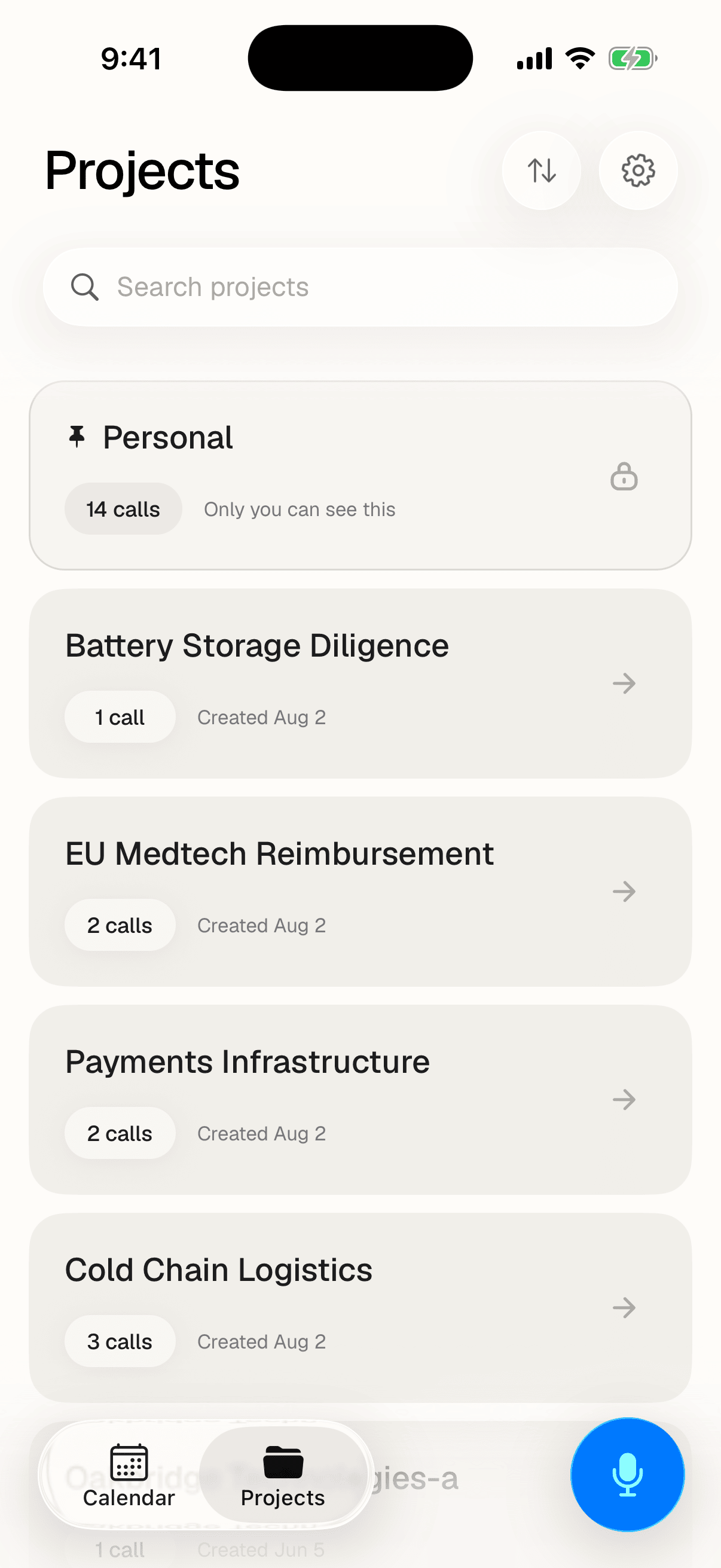
The Projects tab lists every project you have access to. Search across them with Search projects, and reorder with the sort menu: Recently edited, Recently created, Recently viewed or Sort by name. Each card shows how many calls it holds.
Personal always sits first, marked Only you can see this. It's where calls go when they aren't filed into a project.
Open a project and you get Upcoming calls and Past calls, with a Search calls box across them. Long lists load more as you scroll.
Questions
Why is my Calendar tab empty?
Either you have no meetings on the day you're looking at, in which case Junior says "No meetings today", or no calendar is connected yet. Connecting one is done in Junior on your computer, not on your phone; once it's linked, your meetings appear here automatically.
What's Personal?
Calls that aren't filed into a project yet. It's a holding place rather than a project of its own. Nothing about it changes how a call is processed, and you can file a call properly later from Junior on your computer.
I saved a call with No project. Where did it go?
It's saved and processed normally, but it isn't filed under any project, so it won't appear in a project's list. If you can't find it, it's quickest to look on your computer. Next time, choose a project on the details form, or file it from Personal afterwards.